今天我们继续Java的快乐学习吧!:muscle:
第三章 Java类基础知识 课程安排 提示 (1)请认真看视频,课堂练习和课后练习都跟视频内容密切相关;
(2)课堂派上的练习关闭提交后,我会公布练习的答案。
流程
(13:30开始,共8分钟)MOOC视频 lesson03-02 Java类基础知识–基本类型;
(13:39开始,共16分钟)MOOC视频lesson03-03 Java类基础知识–选择和循环结构
(13:56开始,共6分钟)练习
(14:03开始,共10分钟)lesson03-04 Java类基础知识–自定义函数
(14:18开始,共25分钟)学习“Scanner类的使用”视频,以及补充材料“使用Scanner类获取用户输入的数据”
计算圆的面积的代码:
1
2
3
4
5
6
7
8
9
10
11
12
13
public class Program2_2 public static void main (String[] a) Scanner input = new Scanner(System.in); System.out.println("请输入圆的半径:" ); double radius = input.nextDouble(); double area = radius * radius * 3.14 ; System.out.println("圆的半径是:" + radius + '\n' + "圆的面积是:" + area); } }
6.(14:43开始,共22分钟)课堂练习
第二节 Java基本类型和运算符 基本类型 • 基本类型/基本型别
–boolean 布尔
–byte 字节
–short/int/long 短整数/整数/长整数
–float/double 浮点数
–char 字符
布尔类型 • boolean
–只有true,或者false两种值,默认是false
–例子:boolean one = true。
字节类型 • byte
–byte 字节, 1 byte = 8 bits (8位)
–存储有符号的,以二进制补码表示的整数
–最小值-128,最大值127,默认值0
–byte 类型用在大型数组中可以显著节约空间,主 要代替小整数 ,因为 byte 变量占用的空间只有 int 类型的四分之一
–byte在二进制文件读写中使用较多
–例子:byte a = 100,byte b = -50。
整数类型 • short ,16位,2个字节,有符号的以二进制补码表示的整数
–(-3276832767, -2^152^15-1),默认值0
–例子:short s = 1000,short r = -20000。
• int , 32位,4个字节,有符号的以二进制补码表示的整数
–(-21474836482147483647, -2^312^31-1),默认值0
–例子:int a = 100000, int b = -200000。
• long , 64位,8个字节,有符号的以二进制补码表示的整数
–9,223,372,036,854,775,808(-2^63)~ 9,223,372,036,854,775,807(2^63 -1),默认值0L
–定义long类型时最好加上大写的L
–例子: long a = 100000L,Long b = -200000L。
浮点数类型 • float ,单精度,32位,4个字节,符合IEEE 754标准的浮点 数,默认值0.0f。float的范围为1.40129846432481707e-45 ~ 3.40282346638528860e+38 (无论正负)。
–例子:float f1 = 234.5f
• double ,双精度,64位,8个字节,符合IEEE 754标准的浮 点数,默认值0.0d。double的范围为4.94065645841246544e324d ~ 1.79769313486231570e+308d (无论正负) 。
–例子:double d1 = 123.4。
• float和double都不能用来表示很精确的数字。
字符类型 • char 是一个单一的 16 位 Unicode 字符
–最小值是 \u0000(即为0)
–最大值是 \uffff(即为65,535)
–char 数据类型可以储存任何字符
–例子:char letter = ‘A’;。
运算符 • +,-,*, /, %
• 逻辑运算符&&, ||, !
• 比较运算符 !=, >, >=, <, <=, ==
• 移位运算符>>, <<等
• 不用背诵运算符优先级,用括号隔开
转义字符序列
符号
字符含义
\n
换行 (0x0a)
\r
回车 (0x0d)
\f
换页符(0x0c)
\b
退格 (0x08)
\0
空字符 (0x20)
\s
字符串
\t
制表符
"
双引号
'
单引号
\
反斜杠
\ddd
八进制字符 (ddd)
\uxxxx
16进制Unicode字符 (xxxx)
第三节 选择和循环的结构 选择结构 选择结构 :当满足一定条件后,才执行一部分代码,否则会执行另一部分的代码。
• if(布尔表达式) 单种case
• if (布尔表达式) …else 两种case
• if (布尔) …else if (布尔) …else 可以多种case
参看例子IfElseTest.java:point_down:
1
2
3
4
5
6
7
8
9
10
11
12
13
14
15
16
17
18
19
20
21
22
23
24
25
26
27
28
29
30
31
32
33
public class IfElseTest public static void main (String[] args) int a = 5 ; if (a>1 ) { System.out.println("aaaaaaa" ); } if (a>10 ) { System.out.println("bbbbbbb" ); } else { System.out.println("ccccccc" ); } if (a>10 ) { System.out.println("dddddd" ); } else if (a>=5 ) { System.out.println("eeeeee" ); } else { System.out.println("ffffff" ); } } }
多重选择结构 • switch(表达式)
–多个case分支
–满足一个分支后,需要break
–最后一个分支为default
参看例子SwitchTest.java:point_down:
1
2
3
4
5
6
7
8
9
10
11
12
13
14
15
16
17
18
19
20
21
22
23
24
25
26
27
28
public class SwitchTest public static void main (String[] args) int a1 = 1 ; int a2 = 2 ; switch (a1+a2) { case 1 : System.out.println("aaaaaaa" ); break ; case 2 : System.out.println("bbbbbbb" ); break ; case 3 : System.out.println("ccccccc" ); default :System.out.println("ddddddd" ); } String b = "abc" ; switch (b) { case "abc" : System.out.println("eeeeeee" ); break ; case "def" : System.out.println("fffffff" ); break ; case "hgi" : System.out.println("ggggggg" ); break ; default :System.out.println("hhhhhhh" ); } } }
循环结构 • while
• do…while 参看WhileTest.java :point_down:
1
2
3
4
5
6
7
8
9
10
11
12
13
14
15
16
17
18
19
20
21
22
public class WhileTest public static void main (String[] args) System.out.println("=============While Test==========" ); int x = 10 ; while (x < 20 ) { System.out.print("value of x : " + x); x++; System.out.print("\n" ); } System.out.println("=============Do While Test==========" ); x = 10 ; do { x++; if (x%2 == 0 ) { continue ; } System.out.println("value of x : " + x); } while (x < 20 ); } }
• for 参看ForTest.java:point_down:
1
2
3
4
5
6
7
8
9
10
11
12
13
14
15
16
17
18
19
20
public class ForTest public static void main (String[] args) { for (int i=0 ;i<5 ;i++) { for (int j=0 ;j<5 ;j++) { if (j<=i) { System.out.print("*" ); } else { break ; } } System.out.println(); } } }
• break //中断循环并退出
• continue ; //跳出本次循环,继续下次循环
第四节 自定义函数 • 函数必须放在类的范围内
• 修饰词(public 或者 static) 返回值(int 或者void),函数名(形 参列表) {函数体}
• 通常情况下,我们都建议方法是public。
• 函数可以调用其他的函数,例如上例中,main函数调用 了add函数。
• 递归函数 调用,需要注意终止性,参看FactorialTest.java:point_down:
1
2
3
4
5
6
7
8
9
10
11
12
13
14
15
public class FactorialTest public static void main (String[] args) int a = 5 ; int b = factorialCalculation(a); System.out.println("The factorial of " + a + " is " + b); } public static int factorialCalculation (int m) if (m > 1 ) { return m * factorialCalculation(m - 1 ); } else { return 1 ; } } }
• 同一个类中,函数名称可以相同,即重载函数 (overload),但是函数参数的个数或者类型必须 有所不同
• 不能以返回值来区分同名的函数
参看OverloadTest.java:point_down:
1
2
3
4
5
6
7
8
9
10
11
12
13
14
15
16
17
18
19
20
21
22
23
24
25
public class OverloadTest public static void main (String[] args) int a=1 ,b=2 ; System.out.println(add(1 ,2 )); System.out.println(add(1.5 ,2.5 )); } public static int add (int m, int n) { return m + n; } public static double add (double m, double n) { return m + n; } }
Scanner 类的使用 Java通过 Scanner 类来获取用户的输入.
1 2 Scanner input = new Scanner(System.in);
下面用一道例题来体验一下叭
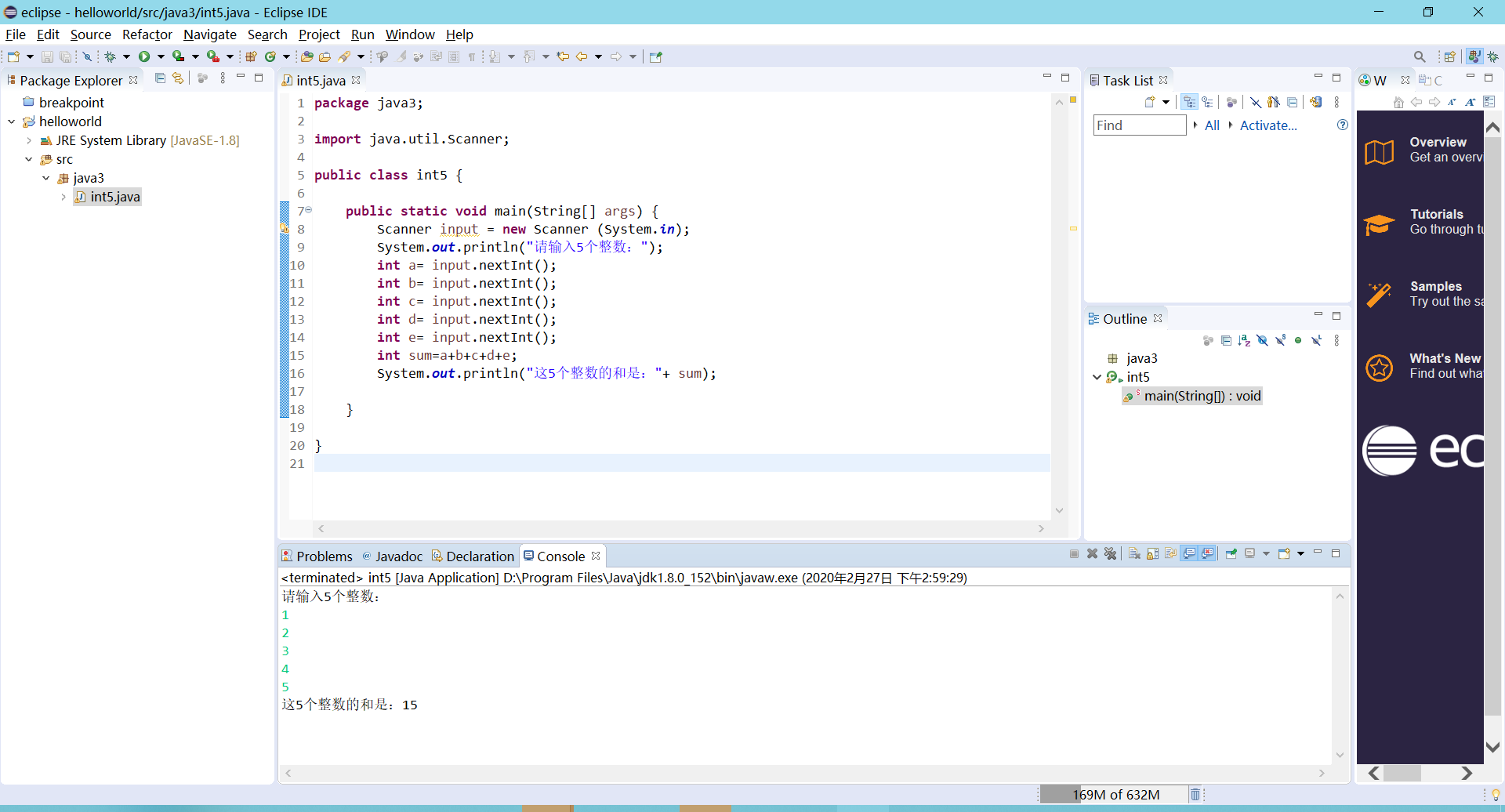
题目:从键盘输入5个整数,求和并输出结果。提示:使用循环读取5个int类型的数据。
1
2
3
4
5
6
7
8
9
10
11
12
13
14
15
16
17
18
19
20
package java3;import java.util.Scanner;public class int5 public static void main (String[] args) Scanner input = new Scanner (System.in); System.out.println("请输入5个整数:" ); int a= input.nextInt(); int b= input.nextInt(); int c= input.nextInt(); int d= input.nextInt(); int e= input.nextInt(); int sum=a+b+c+d+e; System.out.println("这5个整数的和是:" + sum); } }
运行结果:
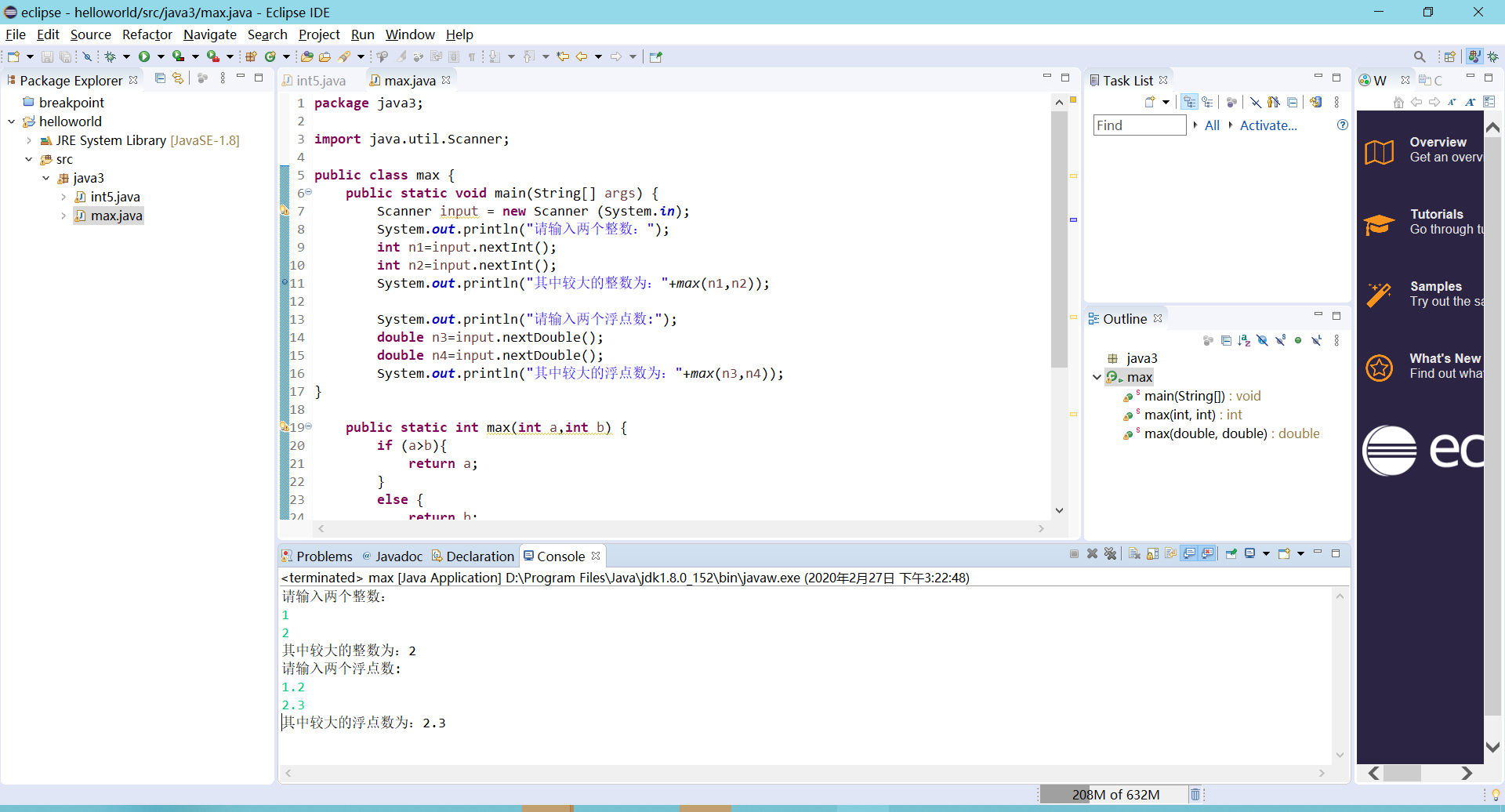
重载函数的应用 求最大数 a) 编写程序比较两个整数和浮点数的大小,并输出较大的数值。要求:
i. 编写两个同名重载方法max,分别用于比较整数和浮点数(double)的大小,并返回其中较大的值;
ii. 在main方法中,读取用户输入的数据,调用max方法,并输出结果。
代码如下: 1 2 3 4 5 6 7 8 9 10 11 12 13 14 15 16 17 18 19 20 21 22 23 24 25 26 27 28 29 30 31 32 33 34 35 36 package java3;import java.util.Scanner;public class max public static void main (String[] args) Scanner input = new Scanner (System.in); System.out.println("请输入两个整数:" ); int n1=input.nextInt(); int n2=input.nextInt(); System.out.println("其中较大的整数为:" +max(n1,n2)); System.out.println("请输入两个浮点数:" ); double n3=input.nextDouble(); double n4=input.nextDouble(); System.out.println("其中较大的浮点数为:" +max(n3,n4)); } public static int max (int a,int b) if (a>b){ return a; } else { return b; } } public static double max (double a,double b) if (a>b){ return a; } else { return b; } } }
运行结果: